HRIS software for outsourcing businesses needs to hold up under complex conditions. That’s because administrative processes at outsourcing companies are considerably more complicated than in most other industries.
Outsourcing companies have to manage a workforce spread across multiple operational sites, placed with numerous client companies that each have their own policies.
Because of this, choosing the best HRIS for an outsourcing business takes more than just looking at brand popularity or user ratings.
Companies also need to make sure the system’s features, flexibility, and scalability genuinely match the operational realities of outsourcing businesses.
This lines up with a McKinsey report explaining that the people management function is increasingly moving toward proactive, data-driven decision-making backed by integrated technology.
Companies need centralized HR data with a clearer development foundation to reduce system fragmentation and improve the quality of decision-making.
In other words, implementing an HRIS isn’t just about digitizing administrative work. It’s the foundation for building workforce management that can adapt more readily to business change.
Key Takeaways
- Outsourcing businesses need a flexible HRIS to manage large workforces across multiple locations, along with different shift rules, payroll schemes, and workflows for each client.
- Don’t choose an HRIS based on rating alone. Also weigh the number of reviews, feature relevance, support for Indonesian regulations, ease of implementation, and how well it fits your company’s operational needs.
- Features like multi-client management, mobile attendance, payroll, contract management, and HR analytics are key aspects to evaluate before choosing software.
How Did We Choose the HRIS Software on This List?
The recommendations in this article aren’t based solely on brand popularity or a vendor’s market share.
We evaluated each software using several indicators: user experience, how relevant the features are to outsourcing business needs, support for Indonesian regulations, and how well the system handles a workforce spread across multiple locations.
We took this approach because outsourcing companies have different needs than businesses with a standard organizational structure.
User Ratings and Reviews
The first indicator we used to build this list was user ratings and reviews.
Ratings give a general sense of how satisfied users are with a piece of software, while reviews help explain what the real-world experience of using it actually looks like.
Beyond the rating itself, the number of available reviews also factors into our assessment. A product with a high rating but very few reviews carries a different level of representativeness than software backed by many reviews from a wide range of companies.
Every pros and cons discussed in this article is drawn from recurring patterns in user reviews, not from the writer’s assumptions or a vendor’s marketing claims.
Feature Relevance to Outsourcing Businesses
Beyond user reviews, we also evaluated whether the features on offer are genuinely relevant to how outsourcing companies operate.
Our assessment didn’t just look at how complete the modules are, but also at the system’s ability to handle the complexity of managing a workforce across multiple locations and client companies.
Some of the aspects we looked at include:
- Centralized employee database
- Multi-company or multi-client management
- Placement location management
- Mobile attendance
- Geolocation or geofencing
- Shift management
- Configurable payroll
- Contract management
- Recruitment and onboarding
- Performance management
- HR analytics
- Client reporting
- Employee self-service (ESS)
Software that can integrate most of these functions tends to be better equipped to support the dynamic nature of outsourcing operations than an application that only focuses on one or two HR processes.
Relevance to HR Processes in Indonesia
Since this article is written for outsourcing companies in Indonesia, we also considered how well each software supports local needs.
This matters because Indonesia’s labor and tax regulations have their own distinct characteristics compared to other countries.
Some of the aspects we evaluated include:
- Income Tax Article 21 (PPh 21) calculation
- BPJS Kesehatan (national health insurance) integration
- BPJS Ketenagakerjaan (workers’ social security) integration
- Overtime calculation in line with regulations
- Management of wage structure and components
- Ability to keep up with changes in labor regulations
- Availability of customer support in Indonesia
Having these features in place helps companies cut down on manual work while minimizing the risk of administrative errors and regulatory non-compliance.
Data Sources Used
To stay objective, this article draws on several data sources, each serving a different purpose.
G2 served as the primary source for user ratings, review counts, and recurring patterns of pros and cons for each piece of software.
For applications that don’t yet have an adequate review base on G2, we used the App Store as an alternative source to get a sense of the mobile app user experience.
Meanwhile, each vendor’s official website was used only to verify which features are actually available.
We did not rely on vendor marketing claims as the primary basis for concluding a software’s strengths.
Summary
| Assessment Criteria | Explanation |
|---|---|
| User rating | Measures user satisfaction levels |
| Number of reviews | Assesses how representative the user experience is |
| Features | Assesses relevance to outsourcing operations |
| Support for Indonesian regulations | Payroll, BPJS, PPh 21, overtime, and compliance |
| Data sources | G2, App Store, and official vendor websites |
Comparing HRIS Software for Outsourcing Businesses
Below is a table giving a quick overview of each HRIS’s main focus, standout features, and the type of company it’s best suited for.
This list was compiled based on a combination of user ratings, feature completeness, and relevance to the needs of outsourcing companies in Indonesia.
| Software | Rating | Features | Best For |
|---|---|---|---|
| LinovHR | 4.6/5 (G2) | Core HR, Payroll, Shift, Mobile Attendance, Recruitment, Contract Management, Performance, Learning, HR Analytics | Mid-size to enterprise outsourcing companies |
| Gaji.id | 5/5 (G2) | Payroll, PPh 21, BPJS, Attendance, Recruitment, ESS | Companies focused on payroll and compliance |
| Mekari Talenta | 4.8/5 (G2) | Attendance, Payroll, Overtime, ESS, Scheduling | SMEs to mid-size companies |
| KantorKu | 4.6/5 (App Store) | Recruitment, Attendance, Payroll, Performance | Growing companies that prioritize mobile HR |
| SunFish by DataOn | 4.5/5 (G2) | Core HR, Payroll, Learning, Performance, Analytics | Large and enterprise companies |
| Smart Salary | 4.5/5 (G2) | Payroll, PPh 21, BPJS, Attendance | Companies that prioritize payroll |
| Gadjian | 4.4/5 (App Store) | Payroll, ESS, Attendance, Shift | SMEs and growing companies |
| GreatDay HR | 3.2/5 (G2) | Attendance, Payroll, Employee Database | Companies that need mobile HR |
| Rippling | 4.8/5 (G2) | Global HR, Global Payroll, IT Management | Multinational companies |
| Darwinbox | 4.4/5 (G2) | Enterprise HCM, Payroll, Performance, Analytics | Enterprise and regional companies |
10 Best HRIS Software Recommendations for Outsourcing Businesses
When choosing HRIS software, it’s worth weighing your company’s specific needs and scalability requirements.
Here are some HRIS software options worth considering in 2026.
1. LinovHR

LinovHR is HRIS software designed to help companies manage the entire employee lifecycle from a central platform.
LinovHR offers a range of modules that can be configured to match a company’s needs, making it flexible enough for businesses with complex HR processes.
For outsourcing companies, that flexibility is a real advantage, since every client has its own organizational structure, shift rules, pay components, and approval workflows.
LinovHR lets companies adapt to these differences without needing to juggle multiple separate applications.
According to G2 data as of July 2026, LinovHR holds a rating of 4.6 out of 5 based on 12 user reviews.
LinovHR features relevant to outsourcing companies include:
- Personnel Administration
- Organization Management
- Recruitment Management
- Digital Onboarding
- Mobile Attendance
- Shift Management
- Payroll Management
- Contract & Document Management
- Performance Management
- Learning Management System
- HR Analytics
- Employee Self-Service
These modules help companies manage employee data across the entire journey from recruitment and placement to contract administration, attendance, payroll, and performance evaluation, all within a single integrated platform.
Based on recurring patterns in G2 reviews, the most frequently mentioned strengths include a user-friendly interface, a more practical attendance process, more flexible HR administration, easy reimbursement, and the ability to centralize HR activities in one system.
On the other hand, a few notes also come up repeatedly in user reviews. Initial implementation and configuration takes longer due to the sheer number of settings available.
New users also need some time to adapt before they can make full use of every module.
Here’s a summary of LinovHR’s pros and cons:
| Pros | Cons |
|---|---|
| Effective offline attendance feature for areas with limited internet connectivity | Initial setup takes longer due to the complexity of available features |
| Available in both cloud and on-premise formats, depending on company needs | Advanced configuration for complex systems requires implementation support from the vendor |
| Flexible, accurate payroll module for calculating salaries, bonuses, THR (holiday allowance), and other company-specific needs | Pricing schemes and service packages vary by company need, so it’s best to confirm directly with the vendor |
| Truly all-in-one, covering the entire HR process end-to-end within a single ecosystem | |
| Very comprehensive performance management features, supporting KPIs, OKRs, and the Balanced Scorecard | |
| 24/7 support team available whenever issues arise |
Best suited for:
- Mid-size to large outsourcing companies
- Companies with many placement locations
- Organizations with different workflows for each client
- Companies that need HRIS and Talent Management on a single platform
2. Gaji.id

Gaji.id is a local HRIS software known for excelling at payroll automation and employee administration.
Many companies choose this solution to simplify payroll while staying compliant with Indonesia’s tax and BPJS regulations.
Beyond payroll, Gaji.id also offers attendance, recruitment, employee self-service, and performance management modules, along with PPh 21 income tax and BPJS management, so companies don’t need to rely on several separate applications.
Based on recurring patterns in G2 reviews, the most frequently cited strengths include onboarding-payroll integration, responsive after-sales support, implementation help from the support team, and easier data-driven HR decision-making.
That said, some users feel there’s still room for improvement in certain features, particularly around UI and UX.
Here’s a summary of Gaji.id’s pros and cons:
| Pros | Cons |
|---|---|
| Payroll can be used for a variety of outsourcing scenarios | Only available as cloud, with no on-premise option yet |
| Supports PPh 21 and BPJS | Only offers basic HR features like payroll and attendance, not ideal for companies needing more complex HR solutions |
| Responsive customer support | Not a fully all-in-one solution |
| Onboarding on a single platform | The user interface isn’t as modern as other vendors’ |
| Supports HR data analysis | Limited integration with other software companies may already be using |
| Offers flat pricing for the first 3 years with no increase | |
| Offers offline attendance for areas with limited internet connectivity |
Best suited for:
- Companies that prioritize payroll
- Organizations that need compliance with Indonesian regulations
- Companies that want hands-on implementation support
3. Mekari Talenta
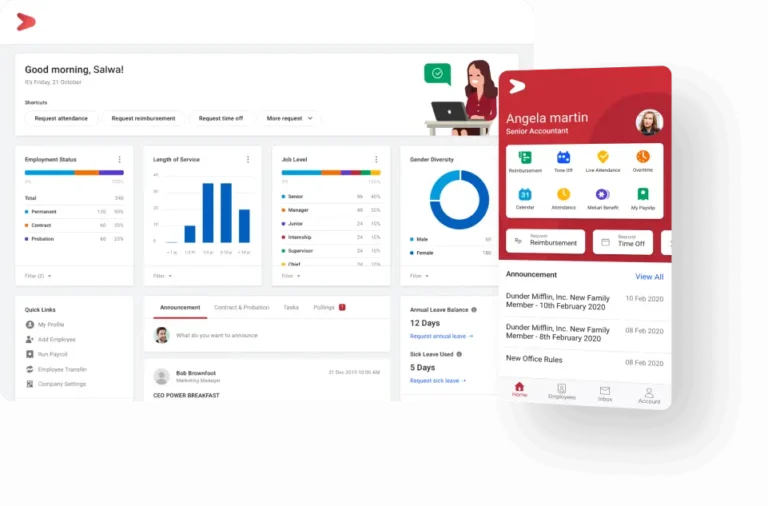
Mekari Talenta is a local HRIS widely used by small to mid-size companies.
The platform integrates attendance, payroll, leave management, overtime, employee scheduling, reporting, and employee self-service, so HR administration can all happen within a single system.
Based on G2 user reviews, Talenta earns a lot of praise for its easy-to-understand interface, attendance-payroll integration, responsive customer support, and comprehensive headcount and labor cost data.
However, some users also report that the system occasionally lags or slows down.
Other noted drawbacks include the geotagging feature taking time to update location, some configurations requiring extra help, and reporting and analytics still being limited for more complex needs.
Here’s a summary of Mekari Talenta’s pros and cons:
| Pros | Cons |
|---|---|
| Fairly complete and practical to use, with solid features for small to mid-size companies | Only available as cloud, no on-premise option |
| Attendance is integrated with payroll, making payroll processing more accurate and less error-prone | Pricing tends to jump significantly in the second year of subscription |
| Connects with other Mekari products (such as Jurnal and Klikpajak for finance/tax) | Fairly steep learning curve due to complex modules |
| Doesn’t require subscribing to other Mekari products to use this HRIS on its own | Customization and system flexibility are very limited |
| Stays very up to date with regulatory changes, making it well suited for outsourcing companies | Support runs on a ticketing system, isn’t available 24/7, and if the resolution deadline is missed, the process resets and must be resubmitted |
| Features fall short for large companies needing strategic HRIS functions (such as workforce planning, advanced analytics, or complex integrations) |
Best suited for:
- SMEs and mid-size companies
- Organizations that want fast implementation
- Companies that need HR and payroll in one system
4. KantorKu
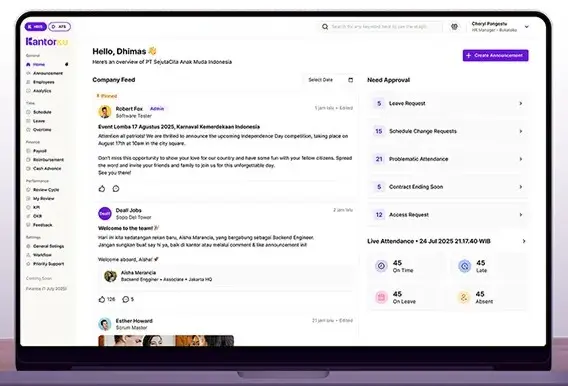
KantorKu HRIS is a local HR platform built to connect HR management processes from recruitment all the way through performance management within a single application.
Besides being available on the web, KantorKu also has a mobile version that makes it easy for both HR and employees to access administrative needs anytime.
To support HR management, KantorKu offers features such as Recruitment, Employee Database, Attendance, Leave Management, Payroll, Overtime, and Performance Management.
This combination of features lets companies manage the HR process from recruitment through performance evaluation on a single platform.
Based on recurring patterns in App Store reviews, KantorKu’s strength lies in its simple, easy-to-understand interface.
Other strengths include practical employee data management, easy access to employment status and tenure information, and a bulk editing feature that helps HR manage large volumes of data.
Customer support has also received positive feedback from a number of users.
On the downside, there are a few limitations, such as restricted half-day leave settings and a schedule bulk-editing feature that could still be made more efficient.
Here’s a summary of KantorKu HRIS’s pros and cons:
| Pros | Cons |
|---|---|
| Easy-to-understand interface | Half-day leave settings are still limited |
| Practical employee data management | Schedule bulk editing could still be improved |
| Employment status and tenure are easy to track | |
| Supports bulk editing | |
| Responsive customer support |
Best suited for:
- Growing companies
- Organizations that prioritize a mobile experience
- Companies that need an all-in-one HRIS with relatively simple implementation
5. SunFish by DataOn

SunFish by DataOn is a Human Capital Management (HCM) system widely used by mid-size to enterprise companies.
The platform offers integrated HR modules to help companies manage HR administration, payroll, and employee development all within one system.
Based on G2 user reviews, SunFish earns positive marks for its strong module integration and its ability to manage the HR process end to end.
SunFish offers features such as Core HR, Payroll, Time & Attendance, Recruitment, Performance Management, Learning Management, Employee Self-Service, and HR Analytics to support comprehensive HR management.
Most users are satisfied with its ease of use, attendance-payroll integration, and customer support.
That said, some users also report that system performance can slow down when processing large volumes of data, and that certain customization processes require consultant support.
Here’s a summary of SunFish by DataOn’s pros and cons:
| Pros | Cons |
|---|---|
| Available as cloud, private cloud, and on-premise | HR teams need extra training before implementation given how comprehensive and complex the features are |
| Highly scalable | Fairly steep learning curve due to fairly complex modules |
| Easy integration with ERP systems and finance software | The app can potentially slow down when processing large amounts of data at once |
| Despite operating internationally (with a Southeast Asia focus), its regulatory compliance support for payroll (PPh 21, BPJS, and regional minimum wage) is already solid | |
| Offers offline attendance support, suited for recording attendance in areas with limited internet connectivity |
Best suited for:
- Mid-size and enterprise companies
- Organizations that need end-to-end HCM
- Companies with complex HR processes
6. Smart Salary

Smart Salary is a local payroll software focused on payroll automation and compliance with Indonesian regulations.
It suits companies that want to improve payroll efficiency without needing overly complex HR modules.
Based on G2 reviews, Smart Salary still has a limited number of reviews, so its rating should be weighed alongside an actual demo.
The software offers Payroll, PPh 21, BPJS, Attendance, and Earned Wage Access (EWA) features to help speed up the payroll process.
Users cite ease of use and reduced manual payroll work as Smart Salary’s main strengths.
However, some of the more advanced features take time to learn, and the still-small review base means the user experience isn’t fully representative yet.
Here’s a summary of Smart Salary’s pros and cons:
| Pros | Cons |
|---|---|
| Easy to use | Advanced features require an adjustment period |
| More automated payroll | Review count is still very limited |
| Reduces manual errors | |
| Speeds up the payroll process |
Best suited for:
- Companies that prioritize payroll
- Organizations focused on compliance
- Companies with simple HR needs
7. Gadjian
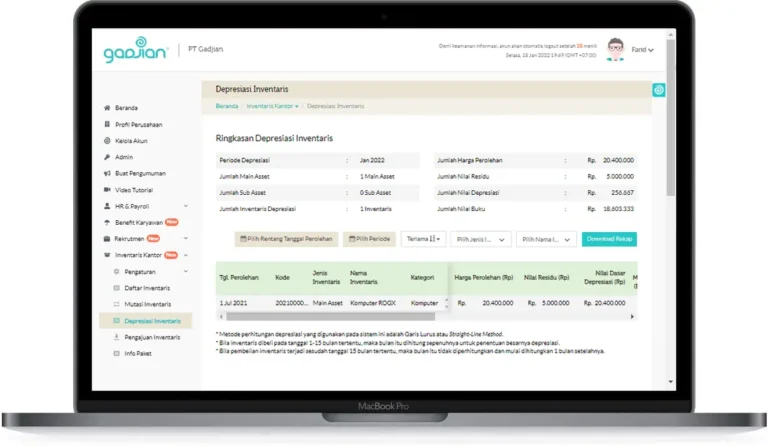
Gadjian is a local payroll and HR administration software that comes with the GadjianKu app as its employee self-service (ESS) component.
The platform helps companies manage HR administration while giving employees self-service access to various HR services.
Based on App Store reviews, GadjianKu holds a rating of 4.4 out of 5 from 69 ratings, most of which come from mobile app users.
Gadjian offers Payroll, Attendance, Leave Management, Shift Management, Overtime, Digital Payslip, and Employee Self-Service (ESS) features to support HR administration.
The software’s strengths include ease of use, the attendance process, digital leave requests, and pay slip access.
However, the available reviews still tend to reflect the employee experience more than that of HR administrative staff.
Here’s a summary of Gadjian’s pros and cons:
| Pros | Cons |
|---|---|
| Simple UI/UX that makes it easy for users to get up to speed | Only available as cloud, no on-premise option |
| Flexible payroll that can be set up per employee | Analytics features aren’t very comprehensive, offering only reports without strategic HR insight |
| Offers an offline attendance mode for recording attendance during internet connectivity issues | HR modules beyond Payroll are still relatively weak |
| Transparent pricing (starting from Rp12,500–Rp20,000 per employee/month) | Customization is still limited at enterprise scale compared to software like LinovHR and SunFish |
| 14-day free trial available | The UI feels less modern than other HRIS apps |
Best suited for:
- SMEs
- Growing companies
- Companies that need payroll and ESS
8. GreatDay HR
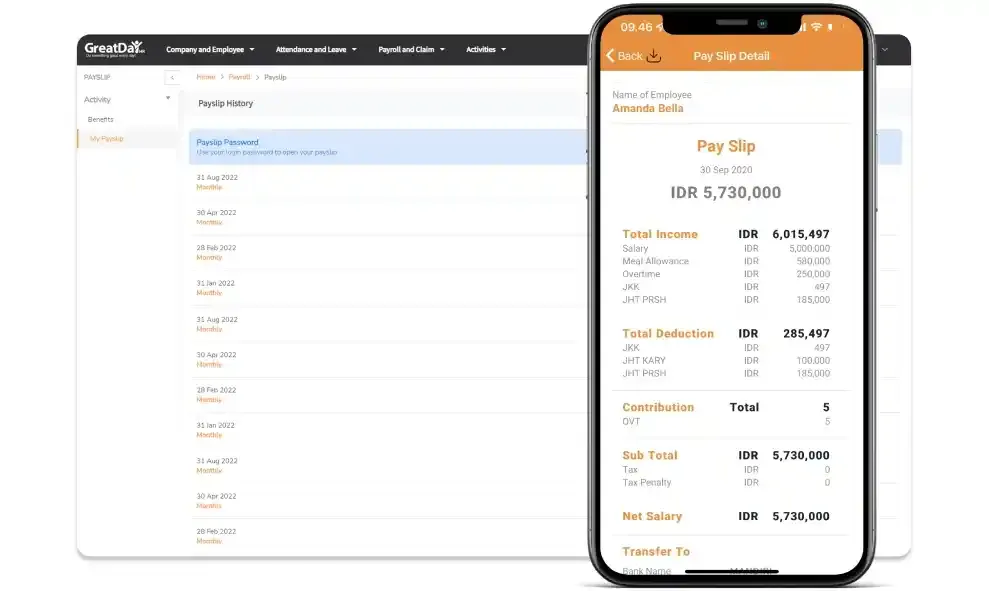
GreatDay HR is a cloud-based HR platform that combines employee data management, attendance, payroll, and employee self-service in a single system.
Its main focus is delivering a practical mobile experience for both HR and employees.
Based on G2 user reviews, GreatDay HR gets positive feedback for its ease of use and implementation process.
The platform supports features such as Attendance, Payroll, Employee Database, Leave Management, and Employee Self-Service to support day-to-day HR administration.
Users find attendance tracking and access to employee data straightforward while using this software.
However, some reviews note that attendance location validation can be overly sensitive, and system maintenance sometimes disrupts the attendance process.
Here’s a summary of GreatDay HR’s pros and cons:
| Pros | Cons |
|---|---|
| Mobile-friendly, making it well suited for outsourced employees | Only available as cloud, no on-premise option |
| Face recognition and liveness detection help prevent attendance fraud | Heavily dependent on internet connectivity for the attendance feature to work |
| Earned Wage Access (EWA) lets employees withdraw pay before the regular payday | Features are limited to basic HR functions like payroll and attendance, not ideal for companies needing more specific HR solutions |
| Good, flexible scalability, with the ability to upgrade as the business grows | Too mobile-focused, making the desktop experience weaker |
Best suited for:
- Companies that prioritize mobile HR
- Organizations that need attendance and payroll
- Companies that want to trial the system before full implementation
9. Rippling
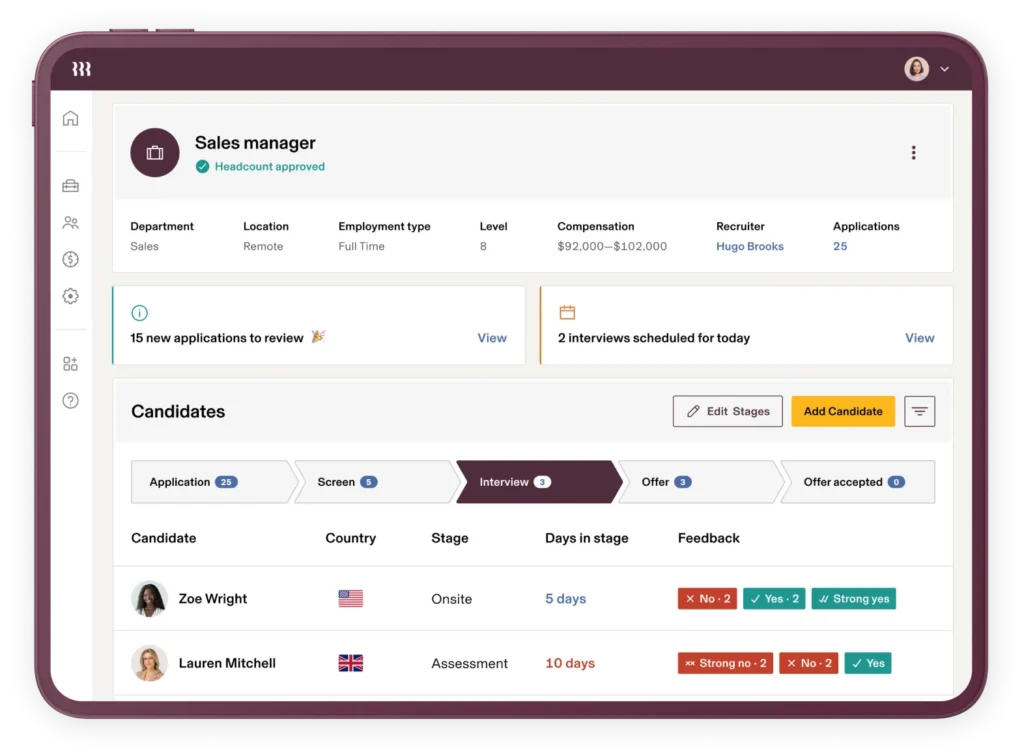
Rippling is a global HR platform that integrates HR, payroll, IT management, and workforce management into a single system.
It’s well suited for multinational companies managing a workforce across multiple countries.
Based on G2 user reviews, Rippling has an especially large volume of reviews with high satisfaction levels.
The platform offers Core HR, Global Payroll, Contractor Management, Time & Attendance, Recruitment, Onboarding, Workforce Management, and IT Management features.
Users see Rippling’s strengths in its workflow automation and cross-module integration.
That said, companies in Indonesia still need to confirm support for BPJS, PPh 21, and local labor regulations before implementing it.
Here’s a summary of Rippling’s pros and cons:
| Pros | Cons |
|---|---|
| Modern, intuitive interface that’s easy to use | Modular (per-module) pricing can push the final cost higher |
| Integrated HR, IT, and finance automation, so tasks that would otherwise require three separate steps can happen automatically | Less relevant for local companies since it isn’t built around Indonesian regulations |
| Live chat feature for quickly addressing complaints and issues | Billed in USD, requiring conversion to Indonesian currency |
| Very large review base |
Best suited for:
- Multinational companies
- Organizations with a cross-border workforce
- Companies that need HR and IT integration
10. Darwinbox

Darwinbox is an Enterprise Human Capital Management (HCM) platform that supports comprehensive employee lifecycle management.
It’s widely used by large companies that need an integrated HR system.
According to G2, Darwinbox holds a rating of 4.4 out of 5 based on 189 reviews, giving it a fairly solid review base.
Darwinbox offers Core HR, Payroll, Attendance, Recruitment, Onboarding, Performance Management, Employee Self-Service, and HR Analytics features to support the HR process end to end.
Users point to the system’s comprehensive modules and ease of use as its main strengths.
Meanwhile, some reviews mention a learning curve, along with performance that can dip under heavy system load.
Here’s a summary of Darwinbox’s pros and cons:
| Pros | Cons |
|---|---|
| Can operate in low-signal areas, making it suitable for outlets with limited internet connectivity | Performance management is overly complex and requires manual updates |
| Strong integration with other software companies may already be using | Loading speed can still be slow, especially when switching between pages |
| The mobile app runs fine on lower-spec phones | The UI isn’t very intuitive, making it harder for users to get up to speed |
| Offers Indonesia-specific payroll already tailored to local regulations | Technical fixes can take a while since they depend on an overseas team |
Best suited for:
- Enterprises
- Regional outsourcing companies
- Organizations that need comprehensive HCM
Which HRIS Software Fits Your Company’s Needs?
Once you’ve compared some of HRIS softwares above, the next step is choosing the system that fits your company’s needs.
This choice depends on business scale, operational complexity, workforce size, and each organization’s specific configuration needs.
The table below can serve as an initial guide for narrowing down your options.
| Company Need | Recommended Software |
|---|---|
| Flexible HRIS for complex outsourcing processes | LinovHR |
| Payroll and Indonesian regulatory compliance | Gaji.id, Smart Salary |
| Easy-to-implement HRIS | Mekari Talenta, KantorKu |
| Large and enterprise companies | LinovHR, SunFish by DataOn |
| Payroll and Employee Self-Service | Gadjian |
| Global workforce management | Rippling |
| Regional enterprise HCM | Darwinbox |
Keep in mind that no single software is the best choice for every company.
The system with the most complete feature set isn’t necessarily the right solution if your company’s needs are relatively simple.
Conversely, outsourcing companies with large workforces and many placement locations need an HRIS that can be configured to match varying workflows, organizational structures, and each client’s policies.
That’s why, beyond comparing ratings and features, it’s worth running a demo session using operational scenarios that genuinely reflect your company’s business processes.
Features to Check When Choosing an HRIS for Outsourcing Businesses
Choosing an HRIS for an outsourcing company takes more than just looking at the feature list on a vendor’s brochure or website.
A system that looks feature-complete on paper won’t necessarily accommodate the operational needs of a company managing hundreds or thousands of workers, numerous placement locations, and different policies for each client.
That’s why, beyond comparing ratings and user reviews, companies also need to evaluate a system’s capabilities against operational scenarios that actually happen on the ground. Here are the features that deserve the most attention.
Support for Multiple Clients and Locations
The defining characteristic of an outsourcing company is managing a workforce placed with many client companies, each with its own organizational structure.
That’s why an HRIS needs to be able to both separate and connect data by client and placement location.
Ideally, the system should be able to:
- Group employee data by client
- Manage multiple organizational structures within a single system
- Restrict access rights by client or site
- Record employee transfer history between locations
- Retain placement history without creating a new employee record
These capabilities make it easier for HR to manage workforce rotation while keeping data consistent whenever an employee moves between projects.
Mobile Attendance and Location Validation
Managing attendance is one of the trickier processes in an outsourcing business, since employees work across so many different locations.
That’s why an attendance system needs solid validation mechanisms to keep attendance data accurate.
Some capabilities worth having include:
- GPS attendance
- Geofencing
- Geotagging
- Face recognition
- Offline attendance
- Support for areas with limited internet connectivity
- Attendance integration with shifts and payroll
These features help companies cut down on buddy punching (attendance fraud) while ensuring attendance data can flow straight into payroll.
Flexible Shift Management
Outsourcing companies have to follow each client’s own operational patterns, some use rotating shifts, split shifts, or schedules that span across days.
That’s why an HRIS needs to accommodate all these scheduling patterns without requiring repetitive manual setup.
Ideally, the system should support:
- Rotating shifts
- Split shifts
- Shifts that span across days
- Bulk scheduling
- Shift swaps
- Different schedules for each client
- Automatic overtime calculation based on the work schedule
This helps HR reduce scheduling errors while speeding up operational administration.
Payroll With Different Schemes for Each Client
One of the biggest challenges in outsourcing is that pay components differ from one location to the next.
For example, allowances, incentives, meal money, transport money, and even wage structures can all vary by work region.
That’s why an ideal HRIS needs a payroll engine that can be configured to match each company’s needs.
Some capabilities worth checking include:
- Flexible pay components
- Allowances
- Incentives
- Meal allowance
- Transport allowance
- Deductions
- Overtime
- BPJS Kesehatan (health insurance)
- BPJS Ketenagakerjaan (workers’ social security)
- PPh 21 income tax
- Differences in provincial (UMP) or regency/city (UMK) minimum wage by location
The more flexible the payroll configuration, the less need there is for manual calculations outside the system.
Contract and Document Management
With so many employees spread across locations, outsourcing companies have to manage a large volume of employment documents.
These can include fixed-term employment contracts (PKWT), placement letters, and various other administrative documents.
Without a solid system, the risk of late contract renewals or lost documents only grows.
That’s why an HRIS should offer:
- Contract expiry reminders
- PKWT status monitoring
- Digital document storage
- Contract change history
- Digital approval
- Audit trail
With centralized documentation, HR can speed up administrative work while improving regulatory compliance.
Mass Recruitment and Onboarding
Outsourcing companies often need to fulfill workforce requests on short notice.
That’s why recruitment and onboarding need to be backed by a system that can handle a high volume of candidates.
Some capabilities worth having include:
- Applicant Tracking System (ATS)
- Talent pool
- Candidate screening
- Digital document collection
- Digital onboarding
- Candidate placement by client
- Monitoring of manpower fulfillment targets
These features help speed up recruitment without compromising administrative quality.
Performance Management and Client Reporting
Beyond HR administration, outsourcing companies also need to deliver regular operational reports to their clients.
That makes reporting capability one of the crucial factors in choosing an HRIS.
Ideally, the system should be able to generate reports on:
- Attendance by location
- Lateness rates
- Turnover
- Workforce productivity
- Manpower fulfillment
- SLA
- Employee KPIs
- Disciplinary violations
- Payroll recap
An easy-to-read dashboard also helps management make faster decisions based on actual data.
Integration and Data Centralization
As a company grows, its HRIS rarely operates in isolation. The system usually needs to connect with other software, such as ERP, accounting, attendance devices, and banking services.
So make sure the vendor offers capabilities like:
- API
- Attendance device integration
- ERP integration
- Accounting integration
- Bank integration
- Single Sign-On (SSO)
- Data migration
This lines up with McKinsey’s view that organizations need more integrated technology and HR data so people management can become more proactive, real-time, and data-driven.
By centralizing information, companies can reduce system fragmentation and improve the quality of their decision-making.
Scalability and System Performance
A growing outsourcing company needs a system that can keep pace with business growth.
An HRIS that runs smoothly with 200 employees won’t necessarily perform the same way once the user base grows into the thousands.
So be sure to also evaluate:
- Employee capacity
- Ability to process payroll in bulk
- Loading time
- Stability under concurrent use
- Adding new locations and clients
- Cloud infrastructure
Confirming scalability upfront reduces the odds of an abrupt system migration down the road as the company grows.
Implementation and Customer Support
How well an HRIS implementation goes also depends on the quality of the vendor’s support, especially for companies with complex workflows.
Some things worth asking the vendor include:
- Implementation timeline
- Data migration support
- Administrator training
- User training
- Customer support SLA
- Dedicated account manager
- Post-go-live support
McKinsey also notes that modernizing the HR function needs to be backed by automation and technology that can boost speed, scalability, and an organization’s strategic impact.
That makes implementation quality and vendor support just as important as the software’s features themselves.
Summary
| Feature | What to Check |
|---|---|
| Multi-client | Data grouping by client and location |
| Attendance | GPS, geofencing, offline attendance, face recognition |
| Shift | Rotating shifts, split shifts, automatic overtime |
| Payroll | BPJS, PPh 21, flexible payroll, different regional minimum wages |
| Contract | Contract reminders, audit trail, digital documents |
| Recruitment | ATS, digital onboarding, talent pool |
| Reporting | SLA, KPIs, turnover, payroll, manpower |
| Integration | API, ERP, accounting, bank, SSO |
| Scalability | Bulk payroll, cloud, performance |
| Support | Implementation, training, after-sales |
Question Checklist for Your HRIS Software Demo
A product demo is the best opportunity to confirm whether an HRIS genuinely fits your outsourcing company’s operational needs.
Don’t just ask the vendor to walk through features in general terms. Use case examples that genuinely reflect your company’s business operations so you can see how the system performs in real situations.
Here’s a checklist of questions you can use during the demo session:
- Can the system group employee data by client and placement location?
- Can an employee be transferred from one client to another without creating a new record?
- Can each client have its own shift rules, payroll setup, and organizational structure?
- Does mobile attendance still work when the internet connection is unstable?
- Does the system support GPS, geofencing, or other location validation methods?
- Can payroll account for differences in provincial (UMP) or regency/city (UMK) minimum wage across regions?
- Does the system have a contract expiry reminder feature?
- Can reports be generated specifically for each client?
- Can supervisor access rights be restricted by specific location or site?
- How long does implementation, data migration, and user training take?
- Are there additional costs for customization, integration, training, or customer support?
The more of these questions the vendor can answer during the demo, the easier it is for your company to evaluate whether the system can genuinely support day-to-day operations.
Don’t hesitate to ask the vendor to simulate scenarios that come up often at your company, such as employees moving between projects, bulk shift schedule changes, or payroll calculations with varying components.
Don’t Choose an HRIS Based on Rating Alone
Rating is a useful indicator in the software selection process. But it’s not the only factor that determines whether an HRIS is a good fit for an outsourcing company.
The first step in selecting HRIS software is paying attention to the number of reviews.
The more reviews available, the more likely you are to find a consistent picture of real user experience.
The second step is choosing software that fits your specific context. A feature that a small company finds perfectly adequate may not hold up against the operational complexity of an outsourcing business.
The reverse is also true: features that large companies rely on may not suit a newly growing business, given how complex those components can be.
The last step in selecting HRIS software is understanding that whether or not an application is feature-rich comes with its own trade-offs.
Enterprise solutions generally offer broader configuration options, but implementation, data migration, and user training also tend to take longer.
Simpler software, on the other hand, may be quicker to adopt, but it can hit limitations as the company grows or needs more complex workflows.
That’s why, beyond comparing ratings and reviews, you should evaluate based on your actual needs and business goals.
This approach lines up with Deloitte’s Human Capital Trends 2025, which stresses that evaluating a technology investment shouldn’t focus on cost efficiency alone.
Organizations also need to consider its impact on how work gets done, the user experience, productivity, and the business outcomes they’re aiming for.
That way, the decision to choose an HRIS can deliver long-term value, rather than just meeting today’s administrative needs.
Summary
- Rating is just one indicator in the evaluation process.
- The number of reviews affects how representative the user experience is.
- Read reviews with your company’s business context in mind.
- The software with the most complete features isn’t necessarily the easiest to implement.
- Run a demo using your real business processes before making a decision.
Manage Outsourced Employee Operations With LinovHR’s Integrated Platform
Managing an outsourced workforce requires a system that can adapt to your company’s operational complexity.
Every company has its own headcount, client structure, placement locations, payroll policies, and workflows.
That’s why choosing an HRIS shouldn’t come down to feature count alone. It should also weigh how well the system can be configured to match your business needs.
As a local HRIS solution with strong system integration, LinovHR offers a range of modules to help companies manage the entire employee lifecycle from a central platform.
LinovHR’s integrated features from Personnel Administration, Recruitment Management, Digital Onboarding, Mobile Attendance, and Shift Management to Contract & Document Management, Payroll, Performance Management, Learning Management, HR Analytics, and Employee Self-Service, all can be managed centrally within a single system.
For outsourcing companies, that’s a real advantage. Beyond centralizing everything in one system, it makes administrative processes more efficient and simplifies managing a workforce spread across multiple locations.
On top of that, integration between modules reduces manual work, improves data accuracy, and makes it easier to compile both operational reports and the reports each client needs.
LinovHR also supports both cloud and on-premise implementation. This strengthens data security and adds the flexibility to fit around whatever systems your company already has in place.
If your company needs HRIS software that can handle employees across many client locations, LinovHR could be the answer. Schedule a free demo today and tailor its features to your company’s needs.
Frequently Asked Questions (FAQ)
What’s the best HRIS software for outsourcing businesses?
There’s no single software that’s always the best choice for every company. The right system depends on employee headcount, placement locations, payroll complexity, client requirements, and integration capabilities. LinovHR is worth considering for companies that need an integrated HRIS that can be configured around the complexity of outsourcing operations.
How do you compare different HRIS vendors?
Use the same operational scenarios across each demo, and compare configuration capability, ease of use, implementation, integration, customer support, security, and total cost of ownership.
Is the highest-rated software always the better choice?
Not necessarily. A rating needs to be weighed alongside the number of reviews, the reviewer’s context, company size, feature completeness, and how well the system actually fits your business needs.
Why does the number of reviews matter?
The number of reviews gives context to the rating itself. A 5.0 rating from two users isn’t nearly as representative as a 4.5 rating from hundreds of users.
Should outsourcing companies choose a local HRIS?
Local HRIS providers have an edge in understanding regulations, payroll, PPh 21, BPJS, language, and customer support within Indonesia. That said, international companies may want to consider global software if they need to manage a workforce across multiple countries.