HRIS software for construction and heavy equipment companies has to operate in far more complex conditions than a standard employee administration system. The workforce can be scattered across many locations, and placement data can change quickly whenever a worker moves from Project A to Project B.
When these changes are still managed through spreadsheets and manual reports, the HR team runs a real risk of recap errors. The result is inaccurate data across work schedules, attendance, overtime requests, payroll calculations, and even decisions about where to place workers on a project.
Construction and heavy equipment businesses also depend heavily on the availability of materials, fuel, spare parts, tools, and smooth distribution to the project site. Supply chain delays are one of the biggest factors that hold back project operations, whether that means materials arriving late, materials getting damaged, or poor material management overall.
That is why choosing HRIS software should never come down to feature count alone. A company needs to assess how well a system fits its multi-project work pattern, worker mobility, field attendance, payroll components, competency tracking, certification management, and workforce analytics needs.
This article covers 10 software recommendations well suited to construction and heavy equipment companies. The assessment draws on G2 reviews as a foundation, then rounds that out with official product information, pricing, and how well each system’s features match the specific needs of construction and heavy equipment businesses.
Key Takeaways
- HRIS software is a system that stores employee data and manages HR administrative processes on a single, integrated platform.
- Construction and heavy equipment companies need HRIS software to run supply chain management more efficiently, manage a workforce spread across many locations, accurately record field worker attendance, integrate shift, overtime, and payroll data, confirm worker competency, and deliver clear workforce visibility.
- HRIS software comes in several categories, including comprehensive HRIS, payroll and workforce HRIS, attendance HRIS, and ERP-integrated HRIS. Each of these four types serves a different function with a different feature set.
- The must-have features for HRIS software at a construction or heavy equipment company are personal administration, mobile attendance, payroll, recruitment, competency and certification management, a learning management system, and HR analytics.
What Is HRIS Software?
HRIS software, or Human Resource Information System, is a system that stores employee data and runs HR processes on one platform. The data it manages can include worker profiles, organizational structure, contract type, work location, attendance, leave, overtime, payroll, recruitment, performance management, competency management, and learning management.
In daily use, HRIS acts as the main data source for workforce planning. Whenever attendance, leave, or overtime data changes, the system automatically processes that information into the payroll calculation. HR no longer has to move data around by hand, over and over again.
For construction and heavy equipment companies, using an HRIS also means thinking about how worker allocation gets distributed. The system should help HR know who is active on each project, who is available, what certifications each worker holds, and when a contract or certification is set to expire.
HRIS is also different from payroll software that focuses only on payment. Payroll is just one part of the broader HRIS ecosystem. A company running many projects needs workforce data to stay well structured before payroll even happens.
Methodology Behind These HRIS Software Recommendations
This list of software recommendations is not meant as an absolute ranking. Every company differs in scale, payroll structure, project policy, and digital readiness. A system that works well for a company with 100 workers will not necessarily hold up for a business group with thousands of workers spread across many entities.
G2 reviews serve as a foundation for understanding user experience, but they are not treated as an absolute ranking for judging whether an HRIS fits a construction or heavy equipment company. The assessments in this article should not be treated as the main benchmark either, since product conditions can change at any time.
Where the G2 review list is incomplete for a given vendor, the assessment instead draws on the vendor’s official website and other information whose accuracy can be verified.
The G2 review research used as the basis for this assessment was conducted on July 26, 2026.
Why Do Construction and Heavy Equipment Companies Need HRIS Software?
The KPMG Global Construction Survey 2025/2026 found that 55% of respondents see a shortage of skilled labor, along with gaps in managerial and technical capability, as their biggest challenge.
Technology adoption and digitalization matter a great deal in the construction and heavy equipment industry, since they help speed up project execution and keep quality consistently high.
That said, workforce readiness remains one of the biggest obstacles to transformation in the construction and heavy equipment industry. Without the capability to use modern technology and digital systems, a company risks project delays, lower ROI, and missed opportunities to adopt automated systems, modular construction, and data-driven models.
As a result, 70% of respondents plan to keep relying on contingent workers, such as temporary and freelance staff. That reality makes it even more important for workforce data to be managed accurately and kept easy to update.
Here are several reasons why construction and heavy equipment companies need an HRIS system for HR management.
1. Making Supply Chain Management More Efficient
Construction and heavy equipment companies sometimes run into supply chain trouble. Materials that don’t arrive on time, damaged goods, ordering mistakes, and poor calculation of material needs are all factors that can disrupt project operations.
With a centralized system, a project manager can report on what a project actually needs, such as workforce and material requirements. Management can then see that information right away and make ongoing decisions much faster.
2. Managing Workers Across Many Projects and Locations
Construction workforce structures change often because they follow the project timeline. Worker demand tends to rise once a project enters its execution phase, then drop again once construction wraps up.
After that, management decides to move some workers to a new project site, place them in worker housing, send them back to the workshop, or have them wait for their next assignment.
An HRIS helps a company record that status in one integrated system. Project managers and HR can then work from the same information when checking worker availability, which cuts the risk of overlapping worker distribution and data analysis mistakes.
3. Recording Field Worker Attendance Accurately
Workers are often spread across scattered project sites. A company needs mobile attendance, location verification, or a centralized device that many workers can share. For sites with limited connectivity, offline attendance and attendance correction features become genuinely critical.
Attendance data that isn’t properly documented risks errors when validating overtime and calculating payroll. That is why a company should consider an HRIS capable of recording attendance time, syncing data automatically, and monitoring the project location.
4. Integrating Shift, Overtime, and Payroll Data
Pay components can differ from one project, location, work division, or worker status to the next. A company might pay daily wages, monthly wages, project allowances, meal money, overtime, reimbursements, loans, and other deductions.
An integrated HRIS helps prepare complete data as the basis for payroll calculation. Even so, HR still needs to verify that attendance, overtime, leave, and permissions line up correctly with the payroll calculation, which helps prevent errors.
5. Confirming Worker Competency and Certification
Heavy equipment operators, technicians, mechanics, engineers, and safety officers each face different requirements. A company needs to know each worker’s competency and certification validity before allocating them to a project site.
KPMG found that 82% of respondents are committed to increasing their investment in training and workforce development. HRIS with competency and learning management helps a company assess position requirements, skill gaps, training, evaluation, and proof of certification.
In Indonesia, the two most relevant certifications for this sector are the SIO (Surat Izin Operator, or Operator Permit) issued by the Ministry of Manpower, which is mandatory for heavy equipment operators and generally valid for about 5 years, and the SKK (Surat Kompetensi Kerja, or Work Competency Certificate) for Construction, issued by a BNSP-licensed professional certification body and regulated by LPJK (the Construction Services Development Institute). The SKK applies from operator level all the way up to expert level, and it is also generally valid for 5 years.
With an HRIS in place, a company can track the expiration date of every certificate type, since all of it is already stored in one integrated system.
6. Giving Management Clear Workforce Visibility
Company management needs complete data for workforce planning. An HR analytics dashboard can show headcount per project, attendance, overtime schedules, turnover rates, contracts nearing expiration, manpower needs, and labor costs.
That visibility helps a company catch problems early before they threaten project productivity. Empty shifts, high overtime, and project delays can all be analyzed by looking at worker distribution and competency data.
Categories of HRIS Software for Construction and Heavy Equipment Companies
Before choosing HRIS software, a company first needs to understand that every software falls into a different HRIS category. Some focus on comprehensive HRIS, handling the entire HR management process, while others focus on payroll, workforce, attendance, or ERP integration.
Understanding each HRIS category is an important step toward choosing software that matches operational needs, business scale, and the complexity of HR management.
1. Comprehensive HRIS or Human Capital Management
This category manages core HR, payroll, recruitment, performance, competency, learning, career, succession, and analytics. It suits large companies, business groups, or organizations that already run a structured talent management process.
LinovHR and SunFish both fall into this category. Both are worth evaluating on project configuration, integration, deployment model, implementation time, and how well the internal team can manage change.
2. HRIS Focused on Payroll and Workforce Administration
This category prioritizes the employee database, attendance, leave, overtime, and payroll. Systems such as Gadjian, CATAPA, Gajihub, and PayrollBozz can work well for companies that want to replace manual processes and get administrative workflows in order first.
3. Mobile HRIS for Field Workers, Focused on Attendance
A mobile HRIS is an employee app that simplifies attendance recording and various requests. Attendance, leave, overtime, approvals, and notifications can all be accessed straight from a phone. GreatDay HR, Mekari Talenta, Gadjian, KantorKu, PayrollBozz, and Gajihub all offer a relevant mobile focus.
4. Modular and ERP-Integrated HRIS
Companies already running ERP, project management, finance, procurement, or asset management systems can choose an HRIS that integrates easily. HashMicro is a solid option through its ERP ecosystem, while LinovHR offers modular implementation with more flexible deployment options.
The advantage of this category is broader data integration across divisions. The challenge lies in implementation scope, the quality of initial data, the integration process, and data change management.
Must-Have Features in HRIS Software for Construction and Heavy Equipment
Construction and heavy equipment companies, which often run multiple projects at once, need an HRIS system with specific features that make it easier to oversee and plan the workforce.
Beyond helping the HR team handle administration, the features an HRIS offers also support smooth project operations.
Here are the must-have features in HRIS software for construction and heavy equipment companies.
1. Managing Multi-Project, Multi-Location Employee Data
The personal administration feature helps a company store data on projects, sites, branches, workshops, business units, supervisors, contract status, and placement history. Location changes need to stay trackable so HR always knows the latest data and who approved it.
This feature can pull together all employee data and track updates by involving employees directly through an Employee Self-Service (ESS) app.
A company can also check employment status (contract, permanent, or freelance) or job position in real time.
2. Mobile and Offline Attendance for Field Workers
One HRIS module that construction and heavy equipment companies cannot do without is time management. This module helps a company track employee attendance and connects directly to a mobile attendance app.
To support the attendance process, a company can look for an HRIS with mobile attendance, a centralized attendance device, offline attendance, and attendance correction. These features make it easier for workers to clock in flexibly, especially when a project site sits in an area with poor signal.
A company also needs to test the clock-in, sync, correction, and approval process before implementing an HRIS.
3. Integrating Shift, Attendance, Overtime, and Payroll
A system needs to connect schedules, attendance, leave, permissions, overtime, project allowances, and other deductions. This makes sure the payroll calculation lines up with actual attendance and every pay component a company owes its workers.
Construction and heavy equipment companies usually deal with a wide mix of employment statuses, from permanent and contract employees to daily and freelance workers. A payroll module can automate compensation or wage payment based on employment status, whether that means daily or monthly pay.
This module can also calculate payroll based on employee performance, giving a company accurate data for handing out bonuses.
A company should also check the system’s ability to handle payroll cutoffs, retroactive adjustments, and different payroll setups across entities.
4. Support for Multi-Entity Payroll and Compliance
Large-scale construction companies in Indonesia typically oversee several subsidiaries or legal entities, whether organized by project or by business line. Each entity has its own corporate tax ID, so PPh 21 income tax reporting has to stay separated by entity, and the same goes for BPJS Kesehatan and Ketenagakerjaan registration, which follows the employing entity rather than the business group as a whole.
A HRIS that supports multiple entities needs to distinguish between two kinds of moves, such as a project transfer within the same entity, which is purely an administrative matter, and a transfer to a different subsidiary, which involves a legal change in employment status and requires a new contract.
Even so, the system still needs to consolidate data for central management visibility while keeping tax and BPJS reporting accurate and separated at the entity level.
5. Recruitment and Manpower Planning
The recruitment feature supports candidate pipeline management, selection, scoring, approval, and onboarding. Through this feature, a company can hire candidates based on the criteria it sets, such as work experience, skill, and education, which helps minimize the risk of a bad hire.
On top of that, construction and heavy equipment companies rely heavily on technical skill, so they need a system that can help them find candidates whose abilities genuinely match the project’s work requirements.
A company also needs to plan worker needs based on timing, location, position, competency, and availability status.
6. Competency and Certification Management
A skill matrix helps a company compare the competency a position requires against the competency a worker actually has. A company needs to map out what competency each position demands, then set the standard a worker has to meet to be considered proficient.
With this module, a company can also send competency assessment forms to workers, which helps identify each worker’s actual skill level.
The system also needs to store certificate numbers, the issuing body, validity periods, and renewal notifications.
7. Learning Management for Training and Safety (K3)
Construction and heavy equipment companies depend heavily on certified workers. An HRIS can help a company map competency, training, and certification validity.
A Learning Management System (LMS) needs to support training plans, materials, pre-tests, post-tests, evaluation, and e-certificates. Training history should ideally stay linked to each worker’s competency profile.
This module matters a great deal because it supports construction and heavy equipment companies in running safety (K3) training, heavy equipment operation training, construction technique training, leadership development, and other competencies that boost project performance.
This proves especially valuable for high-risk work like construction projects. A company needs to keep confirming that its workers have completed the relevant training to keep project work running smoothly.
8. HR Analytics and the Workforce Dashboard
A HR analytics dashboard needs to answer real operational questions, such as active headcount per project, overtime rate, attendance, contracts nearing expiration, labor cost, skill coverage, and training completion.
Through this module, a company can also pull together data from many different sources to get a full picture of its operations.
The raw data collected can then be analyzed and turned into valuable insight for growing the business, and it can be visualized as well to make it easier to understand.
Comparison Table: 10 HRIS Software Options for Construction and Heavy Equipment Companies
| Software | Rating | Category | Scale | Why Choose It? | Price |
| LinovHR | 4.6/5 (12 G2 reviews) | Comprehensive, modular | Mid-sized to enterprise | Companies that need a comprehensive HRIS able to manage HR administration, payroll, competency, training, and a multi-project workforce in a single system | Custom, tailored after a consultation with the sales team |
| Mekari Talenta | 4.8/5 (34 G2 reviews) | Comprehensive HRIS and payroll | Small business to enterprise | Companies that want to digitize HR administration, payroll, and attendance on the cloud, integrated with the Mekari business ecosystem, such as KlikPajak | Custom, based on the chosen package and a consultation with the sales team |
| SunFish by DataOn | 4.5/5 (210 G2 reviews) | Comprehensive HRIS | Mid-sized to enterprise | Companies that need enterprise-scale Human Capital Management (HCM) with a full, integrated set of HR modules. | Custom, requires a consultation with the sales team |
| GreatDay HR | 3.3/5 (3 G2 reviews) | Core HR, attendance, and payroll | Small to mid-sized | Companies that prioritize mobile attendance, payroll, and employee self-service that’s easy for field workers to use | Requires a consultation with the sales team |
| Gadjian | N/A | Payroll, attendance, and HR administration | Small to mid-sized | Companies that want to automate payroll, attendance, and HR administration at a relatively affordable price, in line with Indonesian regulations | Starting from Rp12,500/employee/month |
| EVA HR HashMicro | 4.3/5 (11 G2 reviews) | ERP-integrated HRIS | Mid-sized to enterprise | Companies that want to integrate HR management with ERP, project management, finance, assets, and other business operations | Custom, requires a consultation with the sales team |
| CATAPA | N/A | Payroll platform | Small to mid-sized | Companies that want to prioritize payroll automation and tax compliance before building out a more complex HR system | Contact the sales team |
| KantorKu HRIS | N/A | Attendance and all-in-one cloud HRIS | Startup to enterprise | Companies that need an easy-to-implement, all-in-one HRIS for managing HR administration, payroll, and performance review | Starting from Rp9,900/employee/month |
| PayrollBozz | N/A | HRIS and payroll | Small to mid-sized | Companies that need a practical solution for mobile attendance, payroll, and performance appraisal at a transparent subscription price | Starting from Rp15,000/employee/month |
| Gajihub | N/A | HR administration, attendance, and payroll | Small to mid-sized | Small to mid-sized companies that need a simple, easy-to-use, affordable HRIS for managing payroll, attendance, and employee data | Starting from Rp6,900/employee/month |
The comparison table above helps a company assess how well each software fits its HR operational needs. That said, rating alone should not become the main benchmark for judging a software’s strengths, since it does not necessarily reflect the full range of user experience.
GreatDay HR and EVA HashMicro, for example, have a relatively small number of reviews, so their ratings alone aren’t quite enough to serve as a benchmark for service quality.
The absence of Gadjian, CATAPA, KantorKu HRIS, PayrollBozz, and Gajihub from G2 reviews doesn’t reflect lower product quality either. It’s more a reflection of G2 being dominated by North American and European vendors, while these particular systems focus on serving the Indonesian domestic market.
Given that limitation, evaluating these five systems should go beyond rating alone. Before making a purchase decision, it’s worth testing the features directly against real usage scenarios and checking the track record through testimonials on each vendor’s official website.
Users can also look at other sources of feedback, such as activity and recommendations on a vendor’s LinkedIn page or its Google My Business reviews.
What matters most is that the final decision still needs to match the company’s actual functional needs.
10 Recommended HRIS Software Options for Construction and Heavy Equipment Companies
The order below is not an absolute ranking. This list is organized to highlight how each product’s focus differs, and a company still needs to match the system to its own operational needs.
1. LinovHR

LinovHR offers a set of modules covering Personal Administration, Organization Management, Time Management, Payroll, Recruitment, Performance, Competency, Learning, Career, Succession, and HR Analytics. A company can start with whichever module it wants to prioritize, then bring in other modules as HR management needs grow more complex.
For construction and heavy equipment companies, the main focus is connecting worker data, attendance, overtime, payroll, competency, and training. This matters even more given how these businesses run on a multi-project system that scatters workers across different projects, which makes employee data administration and attendance something that genuinely needs attention.
LinovHR offers both a cloud and an on-premise model. This option matters for companies with different infrastructure or security policies. A system demo is still worth doing to test project structure, worker transfers, per-site payroll, and the dashboard a company actually needs.
This software suits mid-sized to enterprise companies that need core HR and Human Capital Management (HCM) modules.
A company can get a price quote tailored to its headcount, chosen modules, company scale, and a consultation with the sales team.
Relevant features:
- Personal Administration and Organization Management
- Online and offline mobile attendance
- Integrated Time Management and Payroll
- Recruitment Management
- Performance Management with KPI, OKR, and feedback
- Competency Management
- Learning Management System and e-certificates
- Career and Succession Management
- HR and Dashboard Analytics
- Cloud, subscription, and on-premise
| Pros | Cons |
| A wide module range spanning everything from personal administration to talent management. | Initial setup takes time given the sheer number of features and customization options. Users need guidance up front to understand the system and adapt it to company needs. |
| Flexible module implementation that adapts to company needs. | Reporting is somewhat limited for HR analytics needs. |
| Supports field worker needs and competency development. | The initial implementation experience could improve, and server performance needs further optimization for heavy, large-scale data processing. |
| Pricing is calculated based on headcount and modules, scaled to company size, with final pricing also depending on a consultation with the sales team. | Configuration and implementation need careful planning so the chosen modules truly fit the business process. |
| Annual subscription costs stay fairly stable without major price increases. |
2. Mekari Talenta
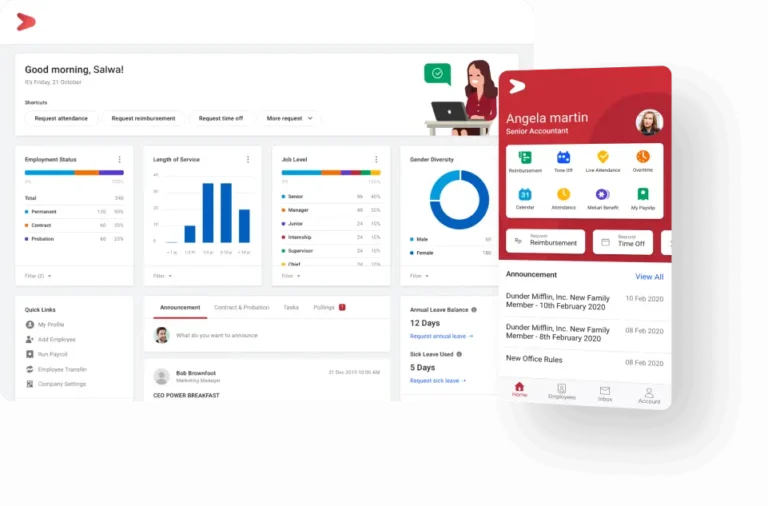
Mekari Talenta manages HR administration, attendance, leave, overtime, payroll, recruitment, and talent development on the cloud. Integration with the Mekari ecosystem adds real value for companies that also need tax withholding slips and a more efficient internal ERP system.
For construction companies, Talenta can support the digitalization of attendance, shift scheduling, training, performance review, and payroll.
Before committing to implementation, a company should first test how well the system supports a multi-project structure, workforce planning, competency management, a learning management system (LMS), and attendance at sites with limited signal.
That step helps confirm that the chosen system genuinely fits the company’s operational needs.
This software suits small, mid-sized, and enterprise companies that prioritize a cloud HRIS with internal ERP integration.
Pricing depends on the package selected. Talenta offers three package options, Essential, Plus, and Talenta 360, each with a different range of features. The final price is determined based on a consultation with the sales team and the specific needs of your business.
Relevant features:
- HR Administration
- Attendance management
- Payroll, compensation, and benefits
- Recruitment
- Talent management
- Employee self-service
- HR Analytics
- Integration with company ERP and the Mekari ecosystem
| Pros | Cons |
| Strong on payroll and Indonesian compliance. | Offline attendance and certification management still need improvement. |
| Attendance, leave, and payroll integration run smoothly. | The dashboard is light on predictive analytics and custom report widgets. |
| Many reviewers find the interface and workflow easy to use. | Response time can be slow. |
| Clean, intuitive visual reporting. | Initial setup takes a while for new users. |
| Suits companies that want an integrated business software ecosystem. | Reporting flexibility is limited. |
| Supports AI-based analytics. | Annual subscription costs have seen fairly significant increases. |
3. SunFish by DataOn

SunFish by DataOn is a comprehensive HRIS covering core HR, attendance, payroll, talent management, recruitment, OKR, employee self-service, and analytics.
SunFish’s strength lies in its broad module coverage and its user base of mid-sized to enterprise companies. This software works well for companies that want to streamline HR management and set a consistent standard across the organization.
SunFish suits mid-sized to enterprise companies that need a comprehensive HRIS with well-integrated HR processes.
This software does not publish pricing openly. The sales team sets pricing based on modules, user count, and the chosen implementation method, whether cloud or on-premise. Users need to contact the sales team directly to get a quote.
Relevant features:
- Core HR and employee records
- Time management
- Payroll and global payroll
- Recruitment
- Performance Management and OKR
- Learning Management
- Employee self-service
- Analytics
- Talent management
| Pros | Cons |
| A user-friendly interface. | Performance slows during peak hours and with large data volumes. |
| Module coverage that fits enterprise needs. | System stability still needs improvement, since technical issues can still show up during certain actions. |
| Smooth integration between modules. | Some configuration options require technical knowledge, so initial setup needs help from the vendor. |
4. GreatDay HR
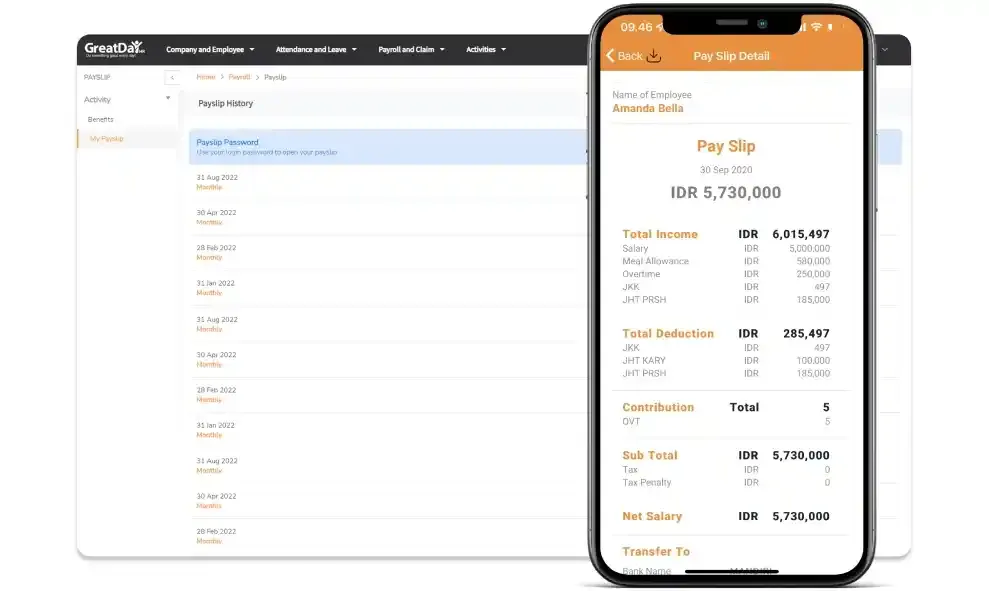
GreatDay HR offers an HRIS and payroll system, with features spanning core HR, attendance, payroll, and strategic HR.
Construction and heavy equipment companies can put all four of these features to work to make HR management more efficient. Core HR helps a company manage employee data centrally, so HR always knows each worker’s status, whether that’s active, assigned to a specific project, or still available for placement.
The attendance and strategic HR features, meanwhile, support real-time attendance recording alongside performance monitoring. That data can then feed into a more accurate payroll calculation.
This software suits small to mid-sized companies that prioritize attendance management, payroll, core HR, and strategic HR.
GreatDay HR does not publish pricing information openly on its official website. To get a quote, users need to reach out to the sales team directly.
Relevant features:
- Core HR (employee data management)
- Mobile attendance
- Payroll
- Strategic HR (recruitment, performance, and engagement)
| Pros | Cons |
| An easy-to-use attendance system with GPS verification that helps prevent fraud. | The desktop version offers fewer features than mobile. |
| Mobile-first and easy for workers to access. | Flexibility, maintenance, attendance locations, and cost all still need improvement. |
| Strong for attendance, payroll, and day-to-day administration. | Performance and recruitment features are fairly basic. |
| User-friendly, with a fairly responsive mobile app. |
5. Gadjian
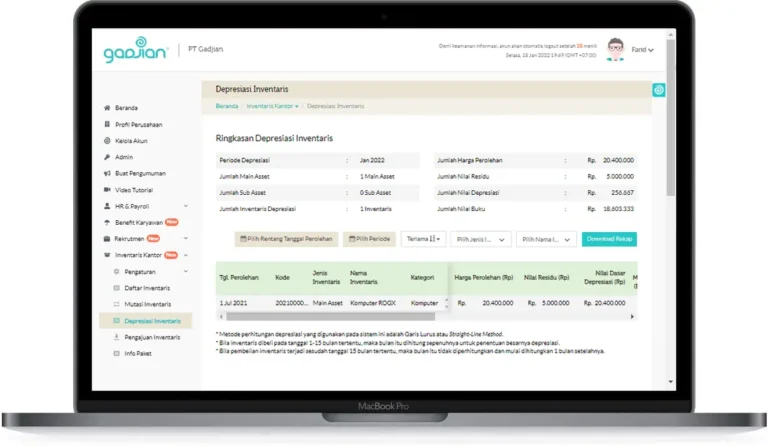
Gadjian offers an employee database, organizational structure, payroll management, attendance, shift scheduling, leave, performance review, recruitment, training, and HR analytics. Its GadjianKu app lets workers clock in, request leave and permissions, log overtime, view pay slips, and check their work schedule.
For construction companies moving away from manual processes, Gadjian can serve as a solid first step for organizing attendance recording, payroll calculation, performance improvement, and approval flows across multiple projects.
This software suits small to mid-sized companies that need payroll, compliance, attendance, shift management, and HR administration at an affordable price.
Gadjian offers several package tiers priced according to feature completeness. The Standard package costs Rp12,500 per employee per month, the Sukses package costs Rp20,000 per employee per month, and the Apresiasi Kinerja package costs Rp6,000 per employee per month.
Relevant features:
- Employee database and organization structure
- Multilevel approval
- Attendance, shift, leave, overtime, and an employee mobile app
- Payroll
- Recruitment
- Performance review
- Training and certification
- HR analytics
| Pros | Cons |
| An intuitive, easy-to-understand interface. | Multi-project workforce depth still needs improvement. |
| Strong data integration that connects easily with other platforms, such as finance apps, attendance devices, and accounting software. | Modules such as performance and recruitment aren’t especially deep. |
| Responsive, attentive customer service. | Low-connectivity site features are worth testing firsthand. |
| An HR analytics feature that’s easy to understand. | The app’s look and feel could feel more modern. |
| The mobile app supports both employee and HR admin needs. |
6. EVA HR HashMicro
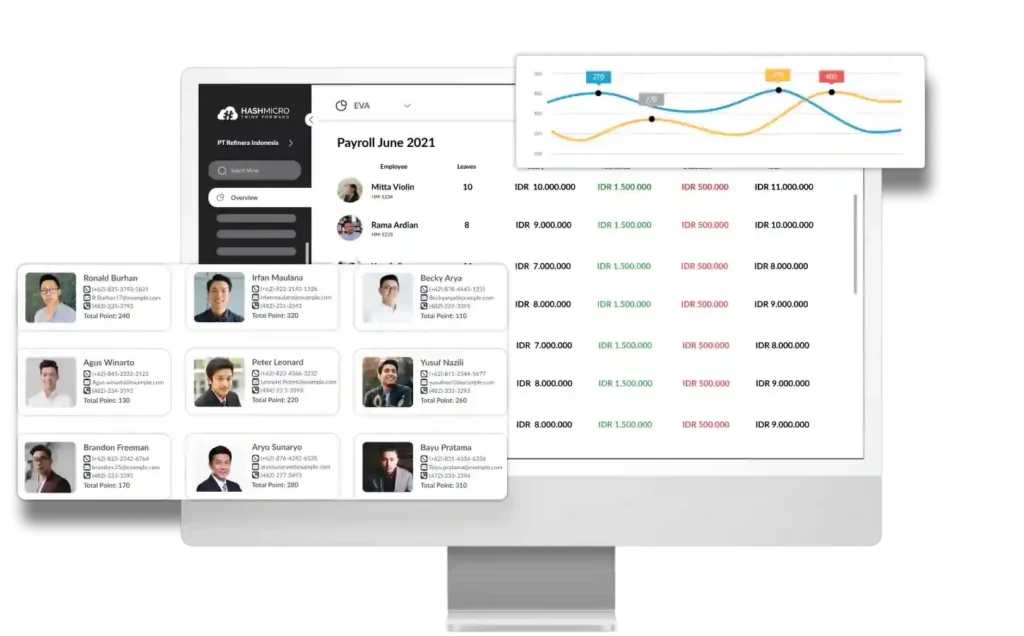
HashMicro offers HR and payroll software as part of a cloud-based ERP ecosystem. For construction and heavy equipment companies, this system stands out because workforce data can connect directly with divisions such as project management, finance, procurement, inventory, and asset management.
Its main value shows up when a company wants to bring people management and project resource management together in one place. Worker data, for example, can be analyzed alongside project progress, cost, assets, or procurement needs, though that integration only works well when the underlying data stays clear and well organized.
A company also needs to test payroll, field attendance, competency, learning, and the overall mobile experience to confirm they meet its actual needs.
This software suits mid-sized to enterprise companies that want to connect HR with ERP, project management, finance, procurement, assets, and other operations.
HashMicro does not publish pricing openly since it’s fully custom. To get a quote that fits your needs, reach out to the sales team directly.
Relevant features:
- Employee administration
- Payroll
- Attendance
- Employee operations
- Recruitment
- Performance
- ERP integration
| Pros | Cons |
| Strong cross-functional integration for companies that want a single ERP ecosystem. | Some bugs still show up during check-in and check-out. |
| An attendance system with GPS and facial recognition. | Migrating data from a company’s internal system takes a fair amount of time, especially for companies with complex data. |
| Customizable to fit specific business processes and operational structures. | Implementation can get more complex given its cross-functional scope. |
| A relevant fit for construction companies that need project, asset, finance, and HR divisions integrated in one system. | Response time can be slow when resolving issues. |
7. CATAPA

CATAPA positions itself as a fast, simple, and secure payroll platform. Its focus covers salary calculation, BPJS Kesehatan and Ketenagakerjaan, PPh 21 income tax, and integrated payroll administration.
Construction companies can consider CATAPA when complex payroll calculation is their biggest pain point. A more focused payroll system can offer a more direct implementation than an overly broad HCM project would in the early stages.
This software suits small to mid-sized companies that want to prioritize payroll automation first. Pricing is not published openly, so reach out to the sales team to find out more.
Relevant features:
- Payroll
- PPh 21
- BPJS Kesehatan and Ketenagakerjaan
- Organization management
- Employee self-service
- Severance pay calculation
| Pros | Cons |
| A clear product focus on payroll and compliance. | Multi-project and multi-entity support still needs improvement. |
| A good fit for companies that want to solve their payroll problems first. | The interface could look more modern. |
| Offers consultation, so a company can test its own formulas. | Flexibility is somewhat limited. |
8. KantorKu HRIS
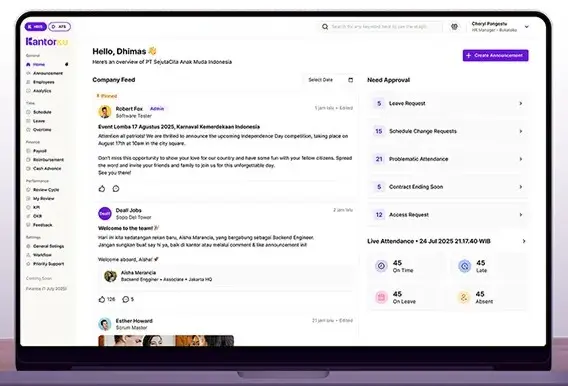
KantorKu is a cloud-based HRIS offering attendance, payroll, an employee database, employee self-service, reimbursement, recruitment, and performance appraisal. This software works across a range of company sizes, from startups to large enterprises.
For construction and heavy equipment needs, KantorKu is worth considering when a company needs to digitize HR management quickly. A company should test location, site, shift, overtime, payroll, and mobile attendance management first to confirm it fits its needs.
Pricing depends on the chosen package tier. Each tier comes with a different set of features and a different headcount allowance. The tiers include starter, basic, essential, and suite.
KantorKu prices its plans starting from Rp9,900 per employee per month. Users can also contact the sales team to consult and learn more about the available packages and features.
Relevant features:
- Attendance
- Payroll
- Employee database
- Employee Self-Service
- Recruitment
- Performance Appraisal
- Reimbursement
- KPI/OKR
| Pros | Cons |
| No implementation cost, plus support for data migration. | Certain customization features come with extra cost. |
| Responsive after-sales support through a WhatsApp group. | Still focused mainly on the Indonesian market. |
| A fairly straightforward interface. | Some more advanced features are only available on the suite package. |
| All-in-one features, from HR administration to performance management. |
9. PayrollBozz
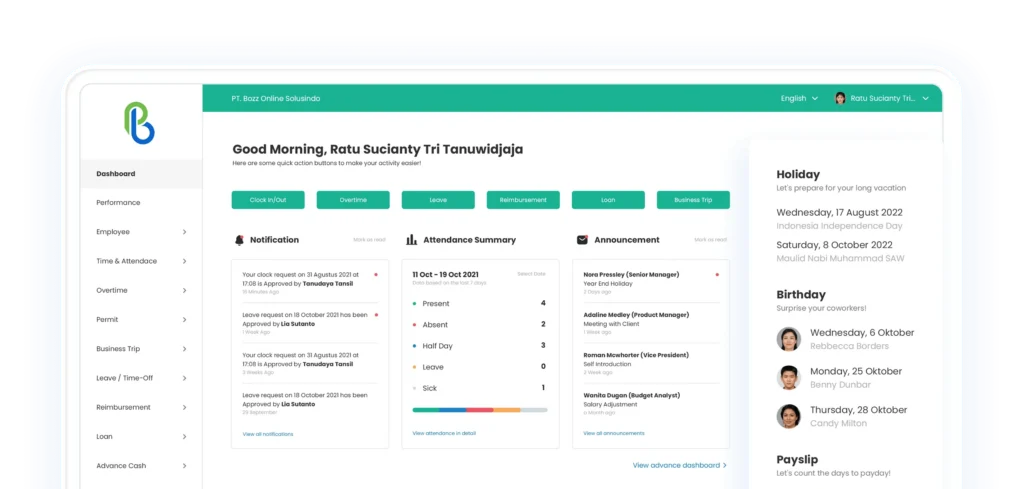
PayrollBozz is a cloud-based HRIS that manages the employee database, attendance, payroll, performance appraisal, KPIs, and reporting. Its mobile app supports schedules, pay slips, leave, reimbursement, loans, attendance, and overtime.
For construction and heavy equipment companies, the combination of mobile attendance and payroll helps cut down on manual recap work. A company can also monitor the daily activity of employees working at a project site, so management can keep track of worker progress in real time.
This software suits small to mid-sized companies that need mobile attendance, payroll, and performance appraisal to support workforce management across multiple project sites.
PayrollBozz offers four package options, Basic, Business, Pro, and Ultimate. Pricing for each tier reflects its feature set, starting from Rp15,000 per employee per month.
Relevant features:
- Mobile attendance
- Employee database
- Leave, permission, and overtime requests
- Payroll
- Performance appraisal
- KPI
- Daily activity monitoring
| Pros | Cons |
| A simple, beginner-friendly interface. | Some more advanced features are only available on the ultimate package. |
| Automated tax and BPJS calculations that stay current with local regulations. | Depth in talent management and more complex HRIS needs still has room to grow. |
| Practical day-to-day administration features for small and mid-sized businesses. | |
| The mobile app covers a wide range of employee self-service needs. |
10. Gajihub

Gajihub is a cloud-based HRIS built to manage HR administration, attendance, and payroll on a single platform.
It covers payroll management, GPS-based attendance and leave tracking, performance review reporting, recruitment, and employee database management.
For construction and heavy equipment companies, using the attendance, performance management, and employee database features makes it easier to monitor and plan a workforce scattered across many project sites.
Gajihub suits small to mid-sized companies that need help managing employee data, attendance, and performance, keeping employee data management well structured according to each project site’s needs.
Gajihub offers three package options, Pro, Elite, and Champion. The Pro package costs Rp6,900 per employee per month, Elite costs Rp14,900 per employee per month, and Champion costs Rp19,900 per employee per month. Beyond these package options, Gajihub also offers a free trial with more limited feature access.
Relevant features:
- Payroll
- Attendance
- ESS
- Performance management reporting
- Recruitment
- Employee database management
- Leave and permission management
- HR data analysis
| Pros | Cons |
| Fairly affordable pricing. | Attendance features fall a bit short. Mobile clock-in with geo-tagging usually isn’t available on the basic package, so the process still ends up manual. |
| Minimal configuration needed, so implementation moves quickly. | The mobile app isn’t the star of the show, so its look stays fairly basic. The focus is more on simply offering a mobile option rather than building it out further. |
| Can be operated without training. | Reporting stays fairly standard, and labor cost analysis isn’t especially deep. |
| Data security is well covered, since every piece of customer data is encrypted and protected with up-to-date technology. Gajihub is already ISO/IEC 27001 certified, the international standard for information security management systems. | Scalability is limited, especially once headcount grows past 50, which makes the workflow heavier and more complex. |
Which HRIS Software is Suitable for Your Company?
Now that you have a detailed look at the features, pros, cons, and pricing of these 10 software options, the next step is figuring out which HRIS actually fits your construction or heavy equipment company’s HR management needs.
Choosing the right software means weighing company scale, priority needs, team readiness, and a deployment model that matches what the company actually requires.
Here’s how to think through choosing HRIS software for a construction or heavy equipment company.
1. Company Scale
For small to mid-sized companies, suitable options include Gadjian, Gajihub, PayrollBozz, KantorKu, and GreatDay HR. For mid-sized to enterprise companies, LinovHR, Mekari Talenta, SunFish, and HashMicro are all worth considering.
2. Most Urgent Priority
Construction and heavy equipment companies vary widely in operational complexity, and each one has its own most urgent need to tackle first when it comes to core HR operations.
If a company wants to tackle payroll and compliance first, CATAPA and Gadjian are worth considering. For the next layer of problems, such as multi-location field attendance, GreatDay HR, KantorKu, and PayrollBozz are a good fit.
For more complex problems, particularly around employee competency, a talent and competency management module becomes essential, and LinovHR and Mekari Talenta both fit that need well.
Meanwhile, a company that wants to integrate its HRIS with an ERP system can look to HashMicro, given its ability to connect business processes end to end.
3. Deployment Model
For companies choosing a cloud implementation, most of the software recommended above already covers that need well. But for companies that need a more flexible, self-managed on-premise option, LinovHR is a solid choice.
4. Team Readiness
For companies migrating away from an older system like spreadsheets and looking to start with something simpler, Gadjian, Gajihub, and KantorKu are all worth considering.
But for companies that need a more complex, modular system, LinovHR, SunFish, Mekari Talenta, and HashMicro become the better fit.
At its core, no single software counts as the best choice for every company scale. A system packed with features won’t necessarily suit a company that only needs the basics, and the same holds true in reverse.
What matters most is choosing a system that can genuinely answer the HR management problems a construction or heavy equipment company actually faces. A company should choose software that fits its own work processes, operational patterns, and internal policies.
Common Mistakes When Choosing HRIS Software
Choosing HRIS software is a strategic decision that shapes a company’s operational efficiency for years to come. Every HRIS vendor has its own strengths and weaknesses, yet companies often gravitate toward whichever software is best known and reasonably priced, without weighing their actual operational needs.
To get the most out of this investment, here are a few mistakes worth avoiding when choosing HRIS software.
1. Focusing Only on Price, Not Business Needs
Price is indeed an important factor when choosing HRIS software. But picking the cheapest option isn’t necessarily the best decision if its features can’t actually support the company’s business processes.
A construction company running many projects across different locations, for instance, needs a system that can handle GPS-based attendance, shift scheduling, and payroll across various wage schemes. Without those features, a company risks ending up with extra costs from having to use a separate application on the side.
That’s why it’s worth confirming that the chosen HRIS can meet the company’s current operational needs while also supporting its growth down the road.
2. Overlooking Ease of Use
Even a feature-packed software won’t deliver much value if it’s difficult for the HR team or employees to actually use.
Choose HRIS software with a simple, easy-to-understand user interface that works on both desktop and mobile devices. That combination speeds up adoption and drives higher day-to-day usage among employees.
3. Failing to Confirm Integration With Other Systems
Construction companies typically already run several supporting applications, such as payroll software, accounting tools, ERP systems, and attendance systems.
If the HRIS can’t integrate with those systems, the HR team ends up entering data manually across several applications at once, which wastes time and raises the risk of data errors.
That’s why it’s worth confirming the HRIS supports integration with the systems a company already uses, keeping the overall business process running more efficiently.
4. Overlooking Software Scalability
A company’s needs keep growing as its project count, work locations, and headcount increase.
An HRIS that suits a small company today won’t necessarily keep up once headcount grows or the company takes on new projects across different regions. That’s why it’s worth choosing software that’s flexible enough to handle future growth without forcing a system change.
5. Overlooking Implementation Services and Technical Support
A successful HRIS rollout depends not just on software quality but also on the support a provider offers.
Confirm that the vendor offers a structured implementation process, user training, thorough documentation, and responsive customer support. That kind of support helps a company work through issues both during implementation and in day-to-day system use.
A solid migration process typically involves four steps. It starts with auditing and cleaning up old data, mapping old data fields to the new system’s structure, migrating module by module (or running both systems in parallel for a few weeks to validate results), and a final check before going fully live.
Before signing a contract, ask the vendor who is responsible for cleaning the data, how long migration is expected to take, and whether you’ll get hands-on support or just documentation.
For a company that has relied on spreadsheets and manual reports up to this point, this stage is what determines whether the move to an HRIS goes smoothly or turns into a headache.
6. Overlooking Employee Data Security
HRIS software stores plenty of sensitive information, from personal data and employment history to payroll details. That makes data security an aspect a company simply cannot afford to overlook.
Confirm that the software provider applies solid security standards, such as user access control, data encryption, regular backups, and system updates that keep company information secure.
Choose HRIS Software That Matches Your Industry’s Needs
Every industry faces its own HR management challenges, and the construction and heavy equipment sector is no exception, managing a workforce spread across many project sites, shift-based work, attendance recording, competency management, and genuinely complex administration.
Before settling on a choice, it’s worth evaluating company needs, available features, ease of integration, and the level of support the software provider offers.
Weighing these factors helps a company choose HRIS software that doesn’t just simplify HR administration but also boosts operational efficiency and supports long-term business growth.
The Business ROI of Using HRIS Software
Some companies see implementing HRIS software as just another expense. Looking at its actual impact on operations and productivity, though, an HRIS is an investment that can add real, lasting value to a business.
Here are some of the ways that investment pays off.
1. Understanding Total Cost of Ownership Before Calculating ROI
The per-employee, per-month pricing shown in the comparison table only covers access or subscription cost. The real total cost of ownership usually also includes initial implementation cost, the cost of migrating data from an old system, training cost for HR and employees, integration cost if the HRIS needs to connect with another system like ERP, and the cost of any add-on modules not included in the base package.
2. Saving Operational Time
Using an HRIS lets a company save real operational time. Many HR administrative processes can run automatically, including attendance, leave management, overtime, and payroll.
To illustrate the value of investing in HRIS software, here’s a simple simulation for a construction company with 200 employees managing several projects at the same time.
Before adopting an HRIS, the HR team handled most administration manually, including attendance recaps, overtime calculations, and payroll.
The company has 3 HR staff, assuming an average labor cost of Rp10,000,000 per month each. Working from that, the cost of 1 HR staff member per hour comes to Rp62,500, with the time saved after adopting an HRIS estimated at 40 hours per month.
Based on that assumption, the calculation looks like this:
40 hours × Rp62,500 = Rp2,500,000 per month
Over a full year, that potential efficiency gain adds up to roughly Rp30,000,000.
Thanks to that time savings, hours once spent on manual HR work can shift toward more strategic activities, such as employee development, workforce planning, or improving employee engagement.
3. Delivering Added Value From the Investment
Using an HRIS for HR management can boost employee productivity, cut down on repeated recruitment costs, and even reduce employee turnover.
For example, a construction and heavy equipment company used an HRIS to make its HR management far more efficient. Attendance became more flexible, leave, permission, and overtime requests all ran through a single system, skill gap identification became more transparent, and HR work moved faster overall.
That efficiency had a major impact, delivering the company a benefit worth Rp200,000,000.
The company invested Rp50,000,000 in its first year of HRIS implementation. So the ROI calculation looks like this:
ROI = (Investment benefit − Investment cost) ÷ Investment cost × 100%
That works out to an ROI of Rp150,000,000 ÷ Rp50,000,000 × 100% = 300%
This result shows the company earned a 300% return on its investment.
4. Reducing Costs From Human Error
An HRIS also helps reduce the cost of human error. Mistakes in salary calculation, attendance recording, or employee data management can all generate extra costs, from administrative corrections to potential conflict with employees.
With an integrated system, that risk of error drops, which helps a company save on operational costs.
5. Faster Decision-Making
An HRIS also improves the quality of decision-making. Real-time dashboards and reports let management get information on workforce productivity, attendance levels, overtime, and staffing needs much faster.
Data-driven analysis helps a company make sharper decisions when optimizing workforce allocation and project operating costs.
6. Improving HR Management Efficiency
For construction and heavy equipment companies juggling many projects at once, an HRIS genuinely helps improve HR management efficiency.
A simpler, centralized administrative process lets a company manage growth in headcount and project count without piling on significantly more administrative work.
The ROI of an HRIS rollout shouldn’t be measured by cost savings alone. It’s also worth looking at improved operational efficiency, faster business processes, reduced error risk, and sustained support for business growth.
That’s why choosing HRIS software should weigh more than price. The long-term business value it delivers matters just as much.
Why Is LinovHR a Good Fit for Construction and Heavy Equipment Companies?
LinovHR is a relevant choice for companies that need more than just attendance and payroll management. As a comprehensive HRIS solution, it allows companies to implement modules gradually based on their needs.
Companies can start with Personal Administration, Organization Management, Time Management, Attendance, and Payroll. As their needs grow, they can add more advanced modules such as Recruitment, Performance, Competency, LMS, and HR Analytics to address the complexities of project-based operations.
For field workers, LinovHR offers online and offline attendance, geolocation, anti-fake GPS, and centralized attendance through the Linov Portal. Attendance data can also be integrated with overtime, leave, permissions, and payroll, reducing the need for manual data verification.
Competency Management and LMS help companies assess workforce readiness, plan training programs, store evaluation results, and issue e-certificates. These features support the needs of operators, technicians, mechanics, engineers, and supervisors, while also helping companies strengthen their understanding and implementation of occupational health and safety (K3).
LinovHR supports both cloud-based and on-premise implementations. This flexibility allows companies to choose an implementation approach that aligns with their operational needs, data security policies, and existing IT infrastructure.
Based on interviews with LinovHR’s functional team, clients such as Aneka Jaringan Indonesia and Bauer Pratama Indonesia found that their HR processes became more organized after implementing HRIS, particularly when it came to administration.
In addition, workers are often hired on a project basis, but it can be difficult to keep track of when their contracts start and end. With HRIS in place, HR teams can clearly monitor contract start and end dates.
Overtime calculations also became more accurate because overtime hours are recorded and approved by the project manager, eliminating the need to rely solely on manual input from site administrators. This also helps reduce the risk of inaccurate or fraudulent attendance and overtime records.
As a result, overtime calculations are more accurate because they reflect the actual duration and applicable overtime rates. Project managers also gain better visibility into workforce and project-related data.
If your company needs an integrated HRIS solution to manage a distributed workforce across multiple locations, LinovHR can be the right choice. Start your HR transformation today by requesting a free demo.
Frequently Asked Questions (FAQ)
1. What HRIS software is suitable for construction companies?
The right HRIS should support multi-project operations, field attendance, shifts, overtime, payroll, competency management, certification tracking, training, and workforce analytics. Companies should also request a demo to ensure the system fits their operational needs.
2. What are the must-have HRIS features for heavy equipment companies?
Key features include an employee database, mobile or offline attendance, integrated payroll, competency management, certification tracking, an LMS, and workforce dashboards.
3. Can HRIS manage employees across multiple projects?
Yes. An HRIS with flexible organizational structures and location management can track employee assignments, employment status, contracts, and transfer history across projects.
4. Can HRIS connect attendance with payroll?
Yes. An integrated system can transfer attendance, leave, permissions, lateness, shift, and overtime data to payroll after validation and approval.
5. How much does HRIS software cost for construction companies?
Costs depend on the number of employees, modules, company size, and consultation results. Companies should evaluate the total cost of ownership rather than focusing solely on subscription fees.